 BrokerMind
The same working day, four times, from a different angle.
Every situation starts differently: on the phone, in your inbox, at the table with the client, or right before a meeting. It always ends the same way: it's in Brokercloud, and all you did was check it and approve it.
The phone call
A client calls: how is his claim file getting on, and is he actually covered for legal expenses? While he's on the line, you ask Chat.
- You ask during the call, in Chat.“What policies does Mr De Smet have, and are there any claims?” The answer comes from Brokercloud, in seconds: three policies, no legal expenses cover, the claim file is waiting on the expert's report.
- You hang up and give one instruction.“Draft a follow-up mail with the status of his claim file and a proposal for legal expenses cover.” The mail is ready, in your tone.
- You check it and send it.The “Create a task” button puts follow-up on the proposal in the file.
The answer goes out before the client has hung up, and the coverage gap is immediately a proposal.
Example: a client's policies and claims, then the follow-up mail
The mail that comes in
A client emails to say he's bought a new car, with the garage's order form attached as a pdf.
- Mail has read it before you open it.Summary of the mail and attachment: which car, what deadline, with the client's file alongside it.
- The reply is ready, in your writing style.One click on the “Comprehensive upgrade” suggestion adds the paragraph about comprehensive cover. Breakdown assistance and driver insurance are queued up as the next suggestion.
- You send it and click “Prepare quote”.The task is in Brokercloud, linked to the client and his motor policy, with a deadline and priority.
The client gets a complete answer that same morning, and the sales opportunity is one click away.
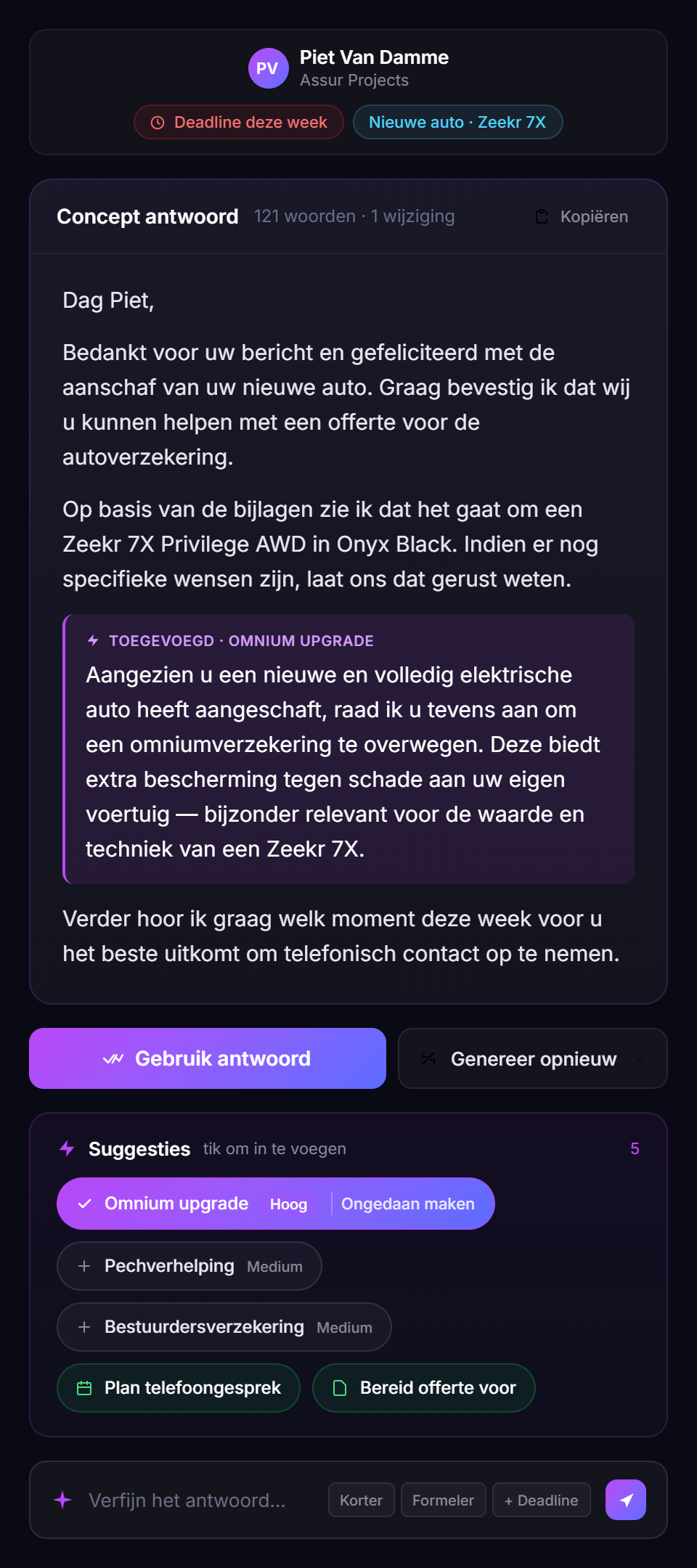
Real screen from the current environment
The client meeting
Mrs Peeters comes in about her new car and her home. An hour at the table, and by five o'clock everything is in the file.
- Meet records and transcribes it.In person or online. The needs analysis is the fixed starting point.
- The report is ready, with action points.Summary, tasks and transcript side by side, ready for approval. One click links it to Brokercloud.
- One question to Chat: “Summarise the meeting and draft the follow-up mail.”The mail is ready in your tone, with what was discussed and what you agreed.
- The tasks are in Brokercloud.“Create a task for the renewal date of her motor policy” and “review the home policy after the renovation”. You check it and send the mail.
The file is complete while the conversation is still fresh. The follow-up mail is with the client the same day, with no evening work.
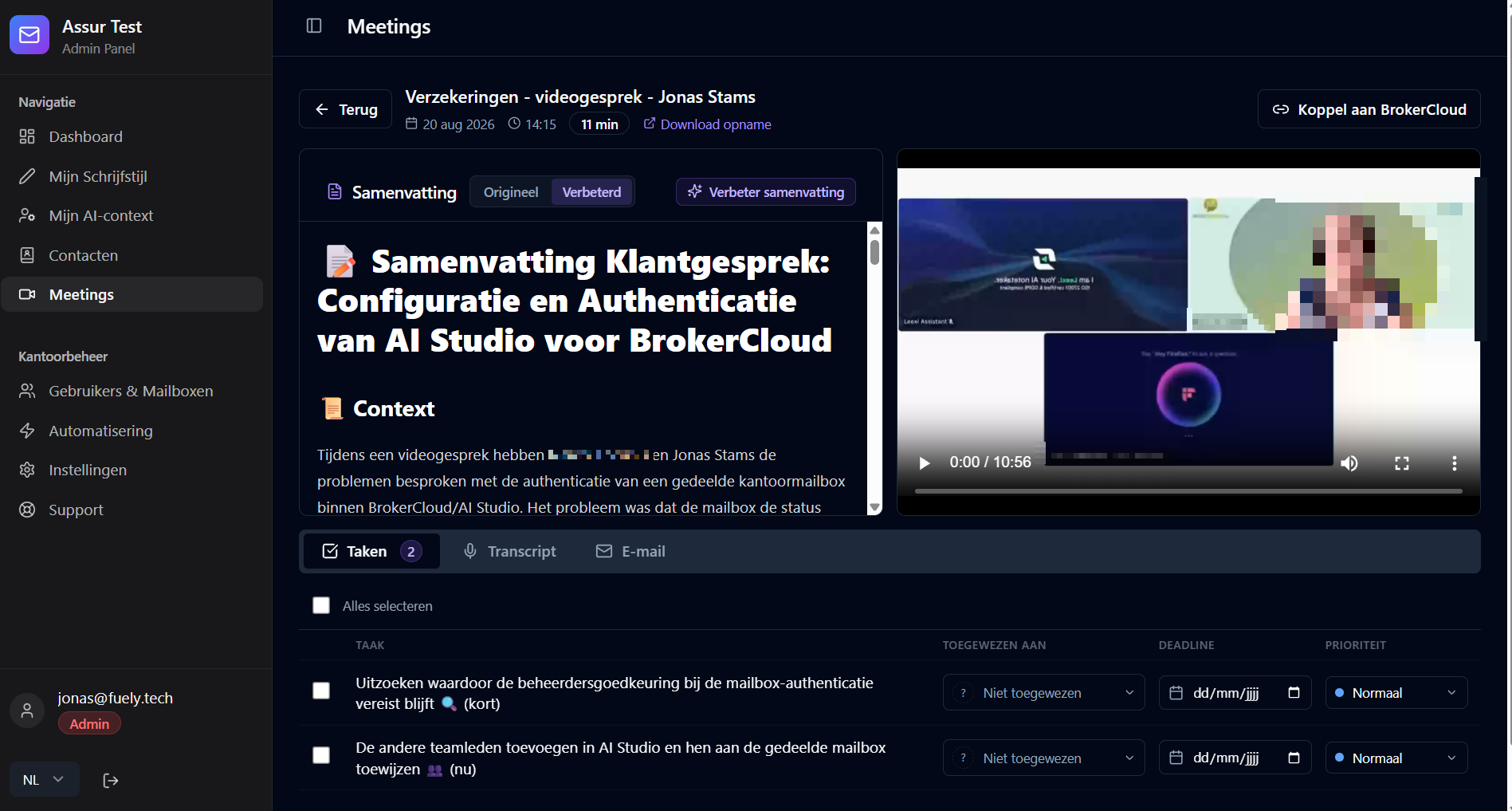
Real screen from the current environment
Example: summarising a conversation and drafting the follow-up mail
The preparation
At 10am the De Smedt family is coming in for their annual review. Five minutes before, you ask Chat for the preparation.
- “Prepare my 10am meeting with the De Smedt family.”Chat pulls the policies and claims from Brokercloud, the previous meeting from Meet and the unread mails from your mailbox.
- The recap is ready as a pdf.One page: household, policies with renewal dates, the open claim, what was agreed last year, two unread mails.
- After the meeting: “Create the tasks for what we agreed.”The action points from the meeting become tasks in Brokercloud, with a deadline.
You walk into every meeting prepared, without opening five screens.
1 page · file, meetings, mails
Example: preparing for a meeting, recap as a pdf
Four situations. Chat can do a lot more.
Chat knows your clients, policies and claims in Brokercloud, your mailbox and your meetings in Meet. Whatever you want to know or have prepared from that, you ask in plain language.
Clients, policies and claims in Brokercloud. Mails in your mailbox. Meetings in Meet.
A meeting from last week, a file, a client's unread mails. The action points from a meeting.
A task for a policy's renewal date. A follow-up mail as a draft, in your tone. You check it and send it.
A recap for a meeting as a pdf. A list or report as Excel. Your own quote or presentation in Word or PowerPoint, if you need one.
Something different for everyone in the office.
BrokerMind doesn't replace the personal work of a broker. It shortens the admin before and after it. What that means in practice depends on where you sit.
Complete files, even after a busy week.
The inbox starts with summaries.
Have the conversation without taking notes.
Already in use at ten Brokercloud offices.
Ten offices have been using Mail daily since June; since September the first offices have moved onto Meet.
See it on your own file instead of ours.
Thirty minutes, tailored to your office. Then 14 days to try it free with your own team.